




Cyber insurers may assess both your business profile and the security controls described in your application. Application answers can affect underwriting and coverage disputes, depending on the policy and applicable law.
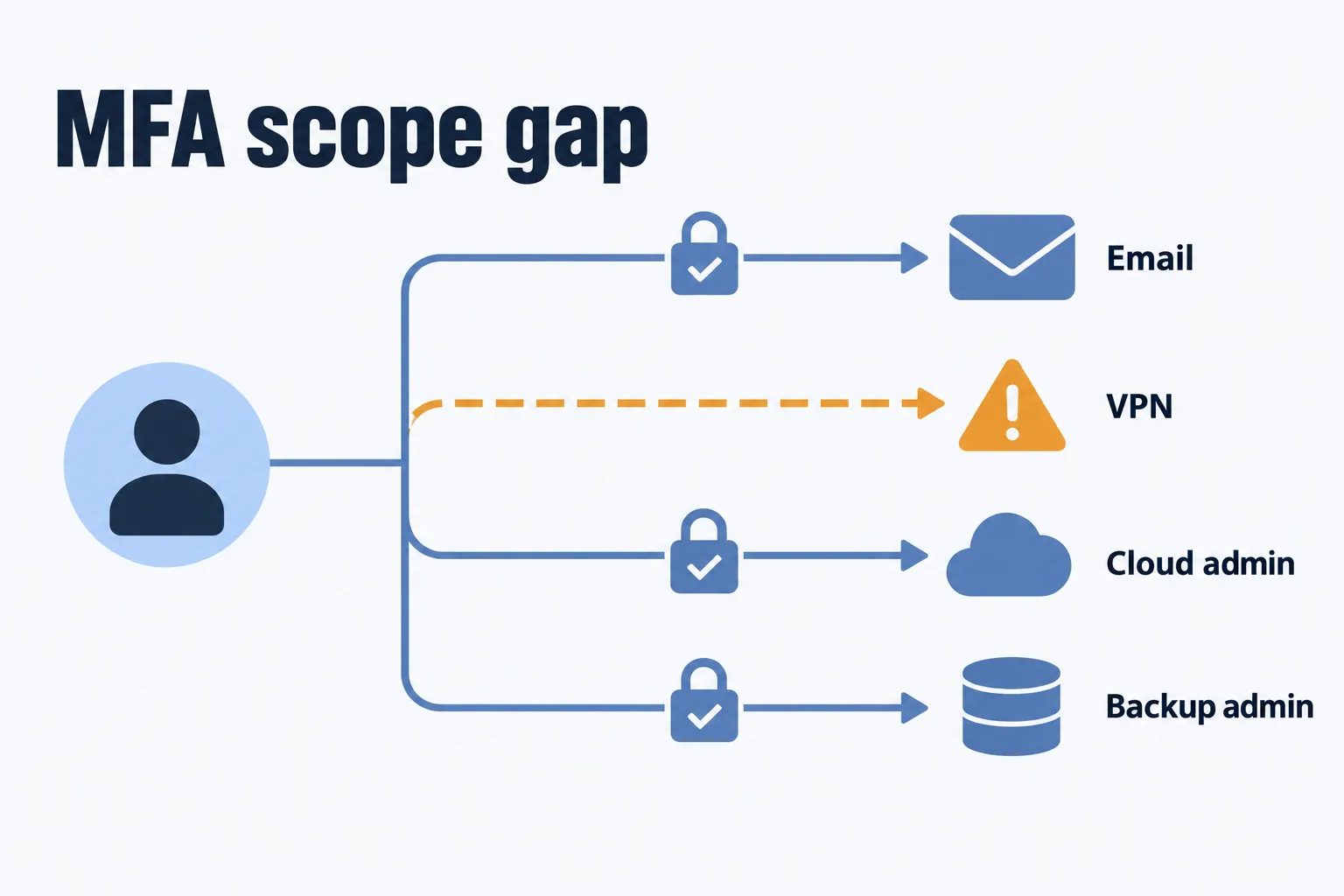
For example, a CFO might answer that multifactor authentication is in place, then discover that it covers email but excludes remote access. Checking the scope with the technical owner before submission helps avoid an inaccurate answer.
This cyber insurance requirements checklist covers twelve control areas to review before applying for or renewing coverage. It is designed for small and midsize organizations, including financial services firms, healthcare organizations, and nonprofits handling sensitive information. Use it to identify gaps, gather evidence, and prepare questions for your broker.
How to use this checklist
Requirements vary by insurer, policy, and risk profile. The Travelers application forms and supplements illustrate how questions can distinguish email, remote access, and administrative controls. Use your current carrier’s form to establish the actual scope.
For your internal review, mark each item Yes, Partial, No, or Unknown. Use N/A only with a documented reason. Then follow the carrier’s answer format and clarify ambiguous questions with your broker. Planned improvements should be identified separately from controls already operating.
For each control, record:
- The exact application question and systems or accounts in scope
- Current status, supporting evidence, and the date checked
- Exceptions or gaps, the responsible owner, and the next action
- A target date for remediation and any questions for the broker
This is a preparation worksheet, not a score that predicts approval or pricing.
12 Controls to Review Against Your Insurer’s Questionnaire
Each item explains what to verify and gives examples of supporting evidence. Confirm which documents your insurer requests.
1. MFA Enforcement Across Required Accounts and Systems
Check multifactor authentication (MFA) across email, remote access, virtual private networks, cloud administration, backup administration, and other privileged access. Include relevant contractor and service-provider access. The scope should match the application question.
Evidence: enforcement policies, covered applications and accounts, exclusions, and relevant sign-in records, alongside registration reports. Microsoft’s authentication reporting distinguishes registration from usage; enrollment alone does not establish that every required access path is protected.
Ask the technical owner to verify the answer. Sixwatch’s identity and access security services support work on MFA, permissions, and account access.
2. Endpoint Detection and Response: Coverage and Monitoring
Endpoint detection and response (EDR) tools monitor activity and support investigation and response. Managed detection and response (MDR) adds a service for monitoring and responding to threats. Confirm who handles alerts, including outside business hours, and what your agreement covers.
Evidence: reconcile the active-agent report with the device inventory. Record protected workstations and servers, excluded or unsupported devices, and how unmanaged or personal-device access is controlled. Document gaps and remediation plans instead of assuming every device has the same protection. Sixwatch provides endpoint protection and managed detection as part of its cybersecurity services.
3. Backups that are separated, encrypted, and tested
Review whether backups are protected against compromise of the production environment. Offline, air-gapped, and immutable backups use different protections. Immutability restricts modification or deletion during a configured retention period; verify that the necessary protections are locked and active.
The second half of the question is testing. When did you last restore from backup, how long did it take, and is that written down?
Evidence: backup scope, job history, protection settings, and dated restore-test results. Record the recovery time objective (RTO), or target restoration time, and recovery point objective (RPO), or acceptable data-loss window. Check administrative access and any systems excluded from backup.
Review Microsoft 365 retention and recovery settings against your restoration needs rather than assuming retention provides every backup capability you need. Sixwatch’s backup and disaster recovery services support recovery planning and backup management.
4. A written, tested incident response plan
The plan should name response roles, escalation steps, and verified contact details for your insurer, counsel, and technology partner. Ask your broker about approved response providers, consent requirements, and applicable notice obligations before an incident occurs.
An annual tabletop exercise can be a useful planning routine; confirm any specific frequency required by your policy or other obligations. Keep response, business-continuity and disaster-recovery plans consistent.
Evidence: the current plan, exercise date, findings, completed corrective actions, and an accessible contact list.
5. Controlled administrator and privileged access
Use separate administrator accounts for privileged work and individually attributable access wherever possible. Document how necessary shared, service, or emergency accounts are controlled. Review elevated permissions and remove access promptly when it is no longer needed.
Evidence: a current privileged-account inventory, a business reason and owner for each account, review records, and offboarding evidence.
6. Email security and phishing defenses
Review filtering, attachment controls, and sender-authentication settings such as SPF, DKIM, and DMARC. These help reduce domain spoofing but do not stop every impersonation attempt. External-sender warnings are one cue, not proof that a message is authentic.
Verify payment instructions and bank-detail changes through independently trusted contact details. Ask your broker how these procedures affect the relevant coverage and conditions; social-engineering and funds-transfer-fraud coverage terms should not be assumed interchangeable.
Evidence: relevant email policies, domain-authentication settings, the payment-verification procedure, and redacted records showing how verification is documented.
7. Patching and vulnerability management on a clock
You need defined timelines for applying critical updates across servers, workstations, firewalls, and network equipment. Match application answers to your actual process and records.
Unsupported systems and network equipment can raise underwriting concerns. Identify affected assets, interim protections and replacement plans, and disclose their status accurately.
Evidence: patch compliance reporting and an asset inventory that matches what is actually plugged in.
8. Security awareness training with proof
Provide recurring training and use phishing simulations where appropriate. Include leadership and relevant temporary or part-time staff, and follow up on missed training.
Evidence: completion records, simulation results and follow-up actions. A falling click rate is not guaranteed, and comparisons should account for differences between exercises.
9. Network segmentation and remote access hardening
Separate guest access from business systems and restrict traffic between network segments according to business need. Avoid exposing Remote Desktop Protocol (RDP) directly to the internet; review protected remote-access methods and MFA.
For distributed teams, assess whether access can be limited to the applications each person needs. Document any exceptions.
Evidence: network diagrams, remote-access settings, access rules, and relevant exposure-check results.
10. Encryption and data protection
Verify encryption on devices holding sensitive data and for relevant storage and transmission paths. Inventory where regulated or confidential data is kept, including older file shares and unapproved storage locations.
Reducing unnecessary retained data can limit exposure, subject to retention duties and legal holds. It does not guarantee a lower premium or a smaller overall incident.
Evidence: encryption status, data inventory, retention policy, and documented exceptions.
11. Logging, alerting, and retention
Logs from your identity system, endpoints, and firewalls should be collected centrally and kept long enough to investigate an incident that started months before anyone noticed. Someone has to be accountable for reviewing alerts, whether that is an internal team or an outside partner.
Verify retention settings before an incident so relevant logs are available. Log availability affects what investigators can reconstruct, alongside other evidence.
Evidence: log-source inventory, retention settings, alert responsibilities, and escalation records.
12. Vendor and third-party risk management
Keep an inventory of vendors that handle your data or access your systems. Set a review schedule based on risk, including onboarding and relevant contract changes. Review notification responsibilities and contractual terms with appropriate advisers.
Identify critical dependencies: what would happen if your cloud platform, payroll provider, or practice-management system became unavailable? Ask your broker how dependent business interruption is defined and covered in your policy.
Evidence: vendor inventory, review dates, relevant agreements, and documented business dependencies.
How Industry Obligations Affect Your Insurance Preparation
One security program can support regulatory and insurance obligations, but each must be checked separately. Meeting one set of requirements does not automatically satisfy the other.
Financial services. SEC-registered investment advisers fall within Regulation S-P’s scope. Other financial institutions may fall under the FTC’s jurisdiction. The FTC Safeguards Rule guidance explains its MFA requirement, including the exception for equivalent secure access controls approved in writing by the Qualified Individual. Identify which rules apply to your firm.
Healthcare. HIPAA-covered entities and business associates should account for applicable risk-analysis and access-control duties. Business associate agreements concern qualifying relationships, rather than every vendor. Include all relevant sites and systems in your review.
Nonprofits. Review donor information, payment processing, and access for volunteers and part-time staff. For example, check whether accounts from a completed seasonal program still have access they no longer need.
The evidence file: what to have ready before the application
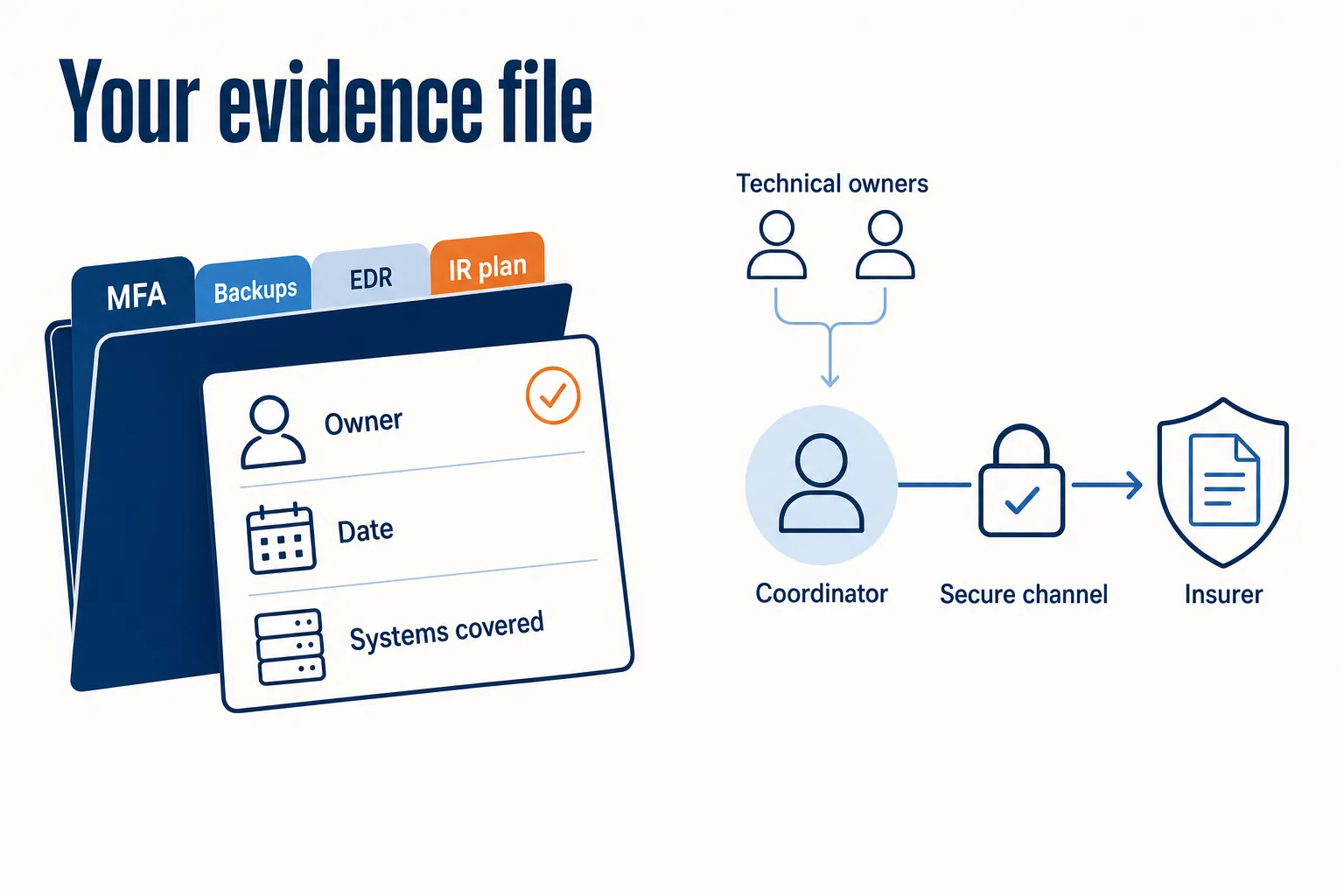
Keep evidence supporting your application answers and provide it when requested. Organize dated records by control area, using the examples above. Give each record an owner and record which systems or accounts it covers.
Assign one questionnaire coordinator, with technical owners verifying the facts. Explain changes from last year’s answers and retain the basis for current responses. Share evidence through an agreed secure channel without including credentials, keys, or unnecessary customer or patient information.
Sixwatch’s cyber insurance readiness support includes reviewing technical controls and documentation gaps. Confirm the deliverables and responsibilities within your engagement scope.
Application Gaps and Coverage Disputes to Discuss With Your Broker
Discuss incomplete controls, unsupported systems, and evidence gaps before submission. Describe current controls accurately and identify planned improvements separately.
In 2022, Travelers sought rescission of a cyber policy, alleging misrepresentations about MFA scope. Lockton’s analysis of Travelers v. ICS reports that the insured agreed to rescission. This case illustrates the importance of accurate answers; it does not establish that every later control lapse automatically voids coverage.
Ask your broker to explain limits, sublimits, exclusions, and conditions for ransomware, social engineering, funds-transfer fraud, and dependent business interruption. Coverage depends on the policy wording and circumstances.
A 90-day plan for your next renewal
Use this as an illustrative planning schedule. Start earlier if major changes are needed, and address urgent security gaps immediately. The schedule does not extend any application deadline or guarantee completion.
Days 1 to 30. Obtain the current questionnaire and compare it with last year’s submission. Review each control, record Partial and Unknown answers, assign owners, and ask your broker about unclear wording. Identify unsupported systems and evidence gaps.
Days 31 to 60. Close the high-impact gaps: extend MFA to remote access and administrator accounts, fill endpoint coverage holes, run and document a restore test, schedule replacement of unsupported systems. Some of that is ongoing management; some is project work such as a cloud migration or a firewall replacement. Knowing which is which helps you budget it properly.
Days 61 to 90. Verify completed changes, organize supporting records, and resolve remaining questions with your broker. Exercise the response plan if due, record open actions, and provide an accurate account of improvements and unresolved exceptions.
Related readingWhat Is Cybersecurity? A Guide for Business OwnersRead the guide →Frequently asked questions
Are these twelve controls mandatory for every cyber policy?
Can we answer Yes while MFA rollout is incomplete?
What if an older system cannot support a requested control?
Who should verify and sign the questionnaire?
Does completing the checklist guarantee coverage or lower premiums?
What should we do if a control stops working mid-policy?
Turning the checklist into a working security program
Gaps can involve incomplete deployment, unclear ownership, or missing evidence. Keep control reviews and documentation current throughout the year so your next application reflects how your systems actually operate.
Sixwatch supports financial services firms, healthcare organizations, and nonprofits with IT and cybersecurity services, including technical insurance-readiness work. We work with firms in Tampa, Sarasota, and Orlando and support distributed teams beyond Florida.
Schedule a consultation to discuss your questionnaire and the scope of technical readiness support you need.